Calculating the fracture gradient
On the Fracture Gradient form (MODEL > Geomechanics > 3D Grid Geomechanical Properties > Fracture Gradient), you calculate the fracture gradient, which is a measure of the pressure needed to induce fractures in a rock at a given depth. It is an important parameter in assessing the stability of a well. Fracture gradient modeling needs an overburden and a pore pressure property as well as other properties depending on the formula you use.
To calculate the fracture gradient
- 3D grid Select the 3D grid for which you want to create a fracture gradient property.
- Overburden stress Select an overburden property of the 3D grid.
- Pore pressure Select a pore pressure property of the 3D grid.
-
Specify the method for calculating the fracture gradient. Each method uses its own formula and specific input parameters. Which method you choose depends on the rock type and the available data. The default name of the output property reflects the selected calculation method.
-
Specify whether to calculate the fracture gradient as a new property, or map the calculation onto an existing property.
Create new property Select to create a new fracture gradient property. Enter a name in the entry field.
Map to existing property Select to map the calculation onto an existing property. The existing property will be overwritten.
- Click Apply to generate the fracture gradient property and keep the form open, or click OK to generate the fracture gradient property and close the form. The property will be added to the 'Static Geomechanical Properties' folder under the 3D grid in the JewelExplorer.
Hubbert and Willis
The Hubbert and Willis method uses overburden stress and pore pressure to calculate the fracture gradient. It assumes a constant ratio between effective horizontal and vertical stress of 1/3. Other than the selected overburden and pore pressure properties no other parameters are needed. A Min and a Max fracture gradient property are calculated.
Matthews and Kelly
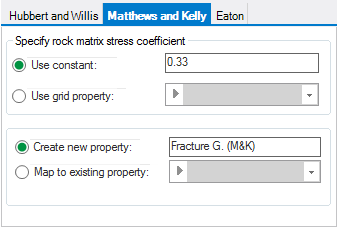
Matthews and Kelly method click to enlarge
Matthews and Kelly assume a variable ratio between the effective horizontal and vertical stresses, which depends on the degree of compaction. An additional parameter Ki, the matrix stress coefficient, must therefore be specified.
To use a constant Ki value, select Use constant Ki. The default is 0.33.
If required you can also use a Ki grid property as the input property for the calculation. Select Use grid property as Ki and select the grid property.
Eaton
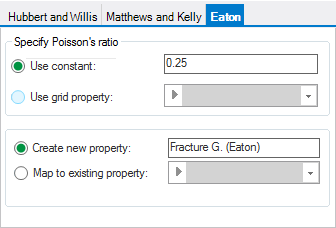
Eaton method click to enlarge
Eaton is an extension of the Matthews and Kelly method. Instead of the matrix stress coefficient it introduces Poisson's ratio into the calculation of the fracture pressure gradient.
To use a constant value for Poisson’s ratio, select Use constant. The default is 0.25.
If available you can also use a Poisson’s Ratio grid property as input property for the calculation. Select Use grid property and select the grid property.
This was the last step of the 3D Grid Geomechanical Properties workflow.